How to Check Application Status of Driving Licence Online (Step-by-Step Guide)
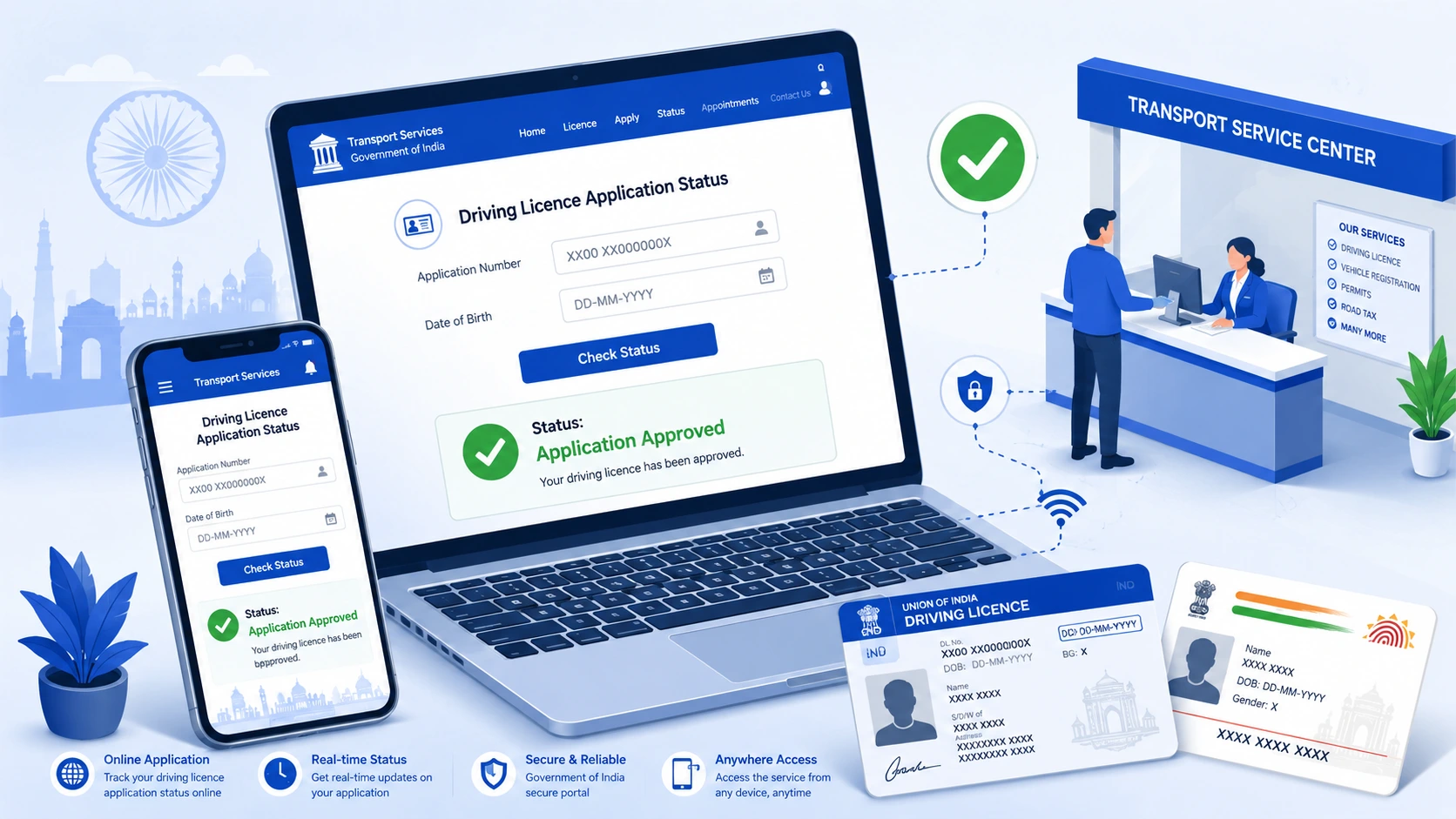
If you’ve applied for a learner’s licence or a permanent driving licence, waiting to find out where your application stands can be stressful — especially if you need your licence urgently. The good news is that you can check application status of driving licence online in just a few minutes, without visiting the RTO in person, using the official Parivahan Sewa portal.
In this guide, we’ll walk you through exactly how to check application status of driving licence, understand your driving licence delivery status, learn how to download driving licence online, and what to do if your status hasn’t updated. We’ll also cover the documents required for driving licence and how the driving licence renewal process works.
Note: Government portals and procedures are updated from time to time. Always cross-check the latest steps on the official Parivahan Sewa website before proceeding.
Quick Answer: How to Check Application Status of Driving Licence?
Here’s the short version — jump to the detailed steps below if you need more help.
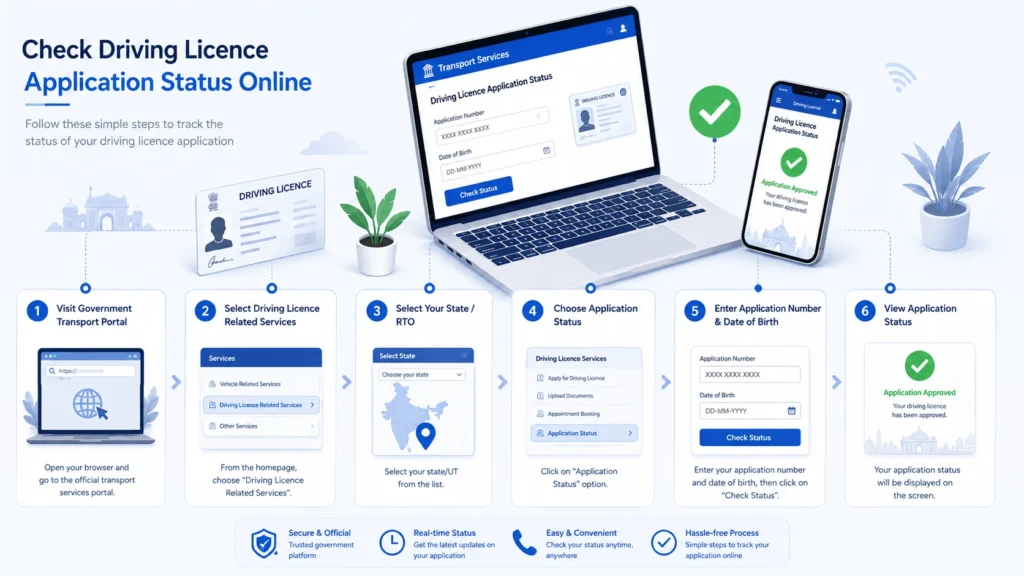
- Go to the official Parivahan Sewa website (parivahan.gov.in)
- Navigate to Driving Licence Related Services
- Select your state from the list
- Click on Application Status
- Enter your application number and date of birth
- Submit the form to view your current status
That’s it — your status should appear on screen. If it doesn’t, see the troubleshooting section further down.
Checking Your Driving Licence Application Status Online
Where to Check DL Application Status
The most reliable place for driving licence status check online is the Parivahan Sewa portal, which is maintained by the Ministry of Road Transport and Highways (MoRTH). Most state transport departments route their driving licence services through this central portal, though some states also offer their own transport department websites. You can also check certain status details through the mParivahan mobile app.
Because URLs and site layouts can change, always start from the official parivahan.gov.in domain rather than searching for third-party or unofficial sites.
Details You’ll Need Before You Start
Keep the following handy before you begin:
- Your application number (given to you at the time of application or test)
- Your date of birth (as submitted in the application)
- Your DL number, if your licence has already been partially processed
- The state where you applied
Having these ready avoids repeated failed attempts, which is one of the most common reasons people get stuck on the status page.
Step-by-Step Process to Check Status
- Visit parivahan.gov.in
- Under “Online Services,” select Driving Licence Related Services
- Choose your state from the dropdown menu
- On the next page, look for an option such as “Application Status” or “Know Your Application Status”
- Enter your application number and date of birth
- Complete any CAPTCHA verification shown
- Click Submit to view your current status
Your screen should then display the current stage of your application.
Understanding Different Application Status Messages
Depending on the stage your application is in, you may see messages indicating that it is under process, has been approved, is being printed, or has been dispatched. The exact wording can differ slightly between states and portals, so don’t be alarmed if the terminology on your screen doesn’t match exactly what’s described here — treat this as a general guide to the typical stages rather than official terminology.
What to Do If Status Is Not Updated
If your status hasn’t changed for an unusually long time:
- Double-check that you entered the correct application number and date of birth
- Allow a reasonable processing window before assuming there’s an issue — processing times vary by state and RTO workload
- Try checking again after 24–48 hours, as portals sometimes lag in reflecting updates
- If there’s still no movement after a reasonable period, contact your RTO directly, use the helpline listed on the Parivahan portal, or reach out to our team for guidance
How to Check Driving Licence Delivery Status
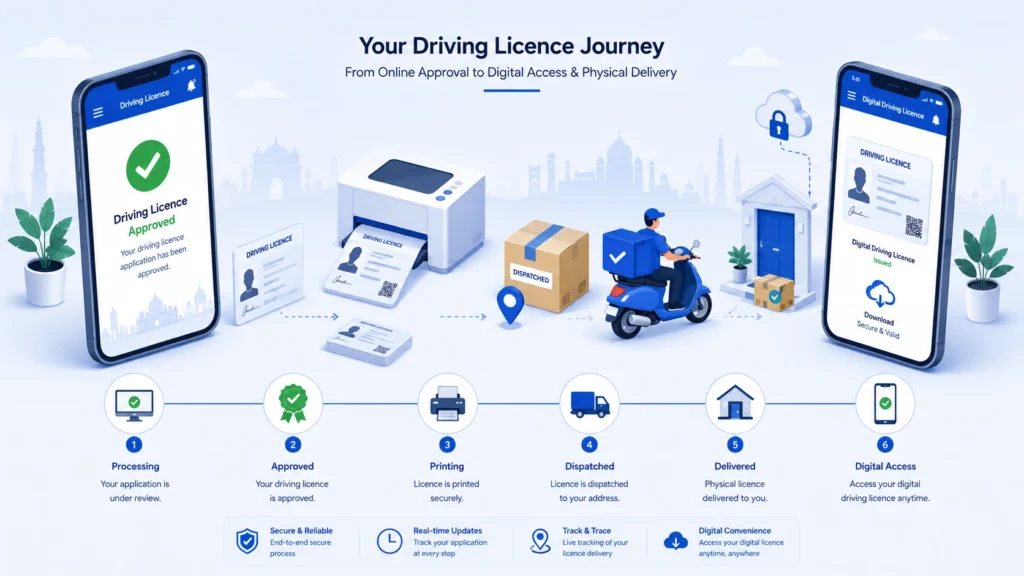
Getting an “approved” status doesn’t always mean your physical licence card is on its way to you immediately — checking your driving licence delivery status separately can tell you where the card actually is.
In general, applications tend to move through stages like:
- Application under processing — your documents and test results are being reviewed
- Approved — your application has been cleared
- Licence printing — your physical card is being prepared
- Dispatched — the card has been handed to the courier/postal service
- Delivered — the card has reached you
- Pending — additional action may be needed on your part
Again, exact status labels can vary by state, so treat these as general stages rather than fixed official terms. If your card shows as dispatched but you haven’t received it after a reasonable number of days, check for a tracking or dispatch reference number on the portal, and reach out to your local RTO if there’s no update.
How to Download Driving Licence Online (Digital DL)
Even before your physical card arrives, here’s how to download driving licence online as a valid digital copy.
Downloading via DigiLocker
DigiLocker is the Government of India’s official digital document wallet. If your driving licence has been issued and linked, you can typically fetch it directly from your DigiLocker account under issued documents.
Downloading via mParivahan App
The mParivahan app, also run under the Ministry of Road Transport and Highways, allows users to view and share their driving licence details digitally in many cases.
Digital DL vs Physical Card
A digital driving licence accessed through DigiLocker or mParivahan is generally treated as a valid form of the document. However, it’s still worth keeping track of your physical card’s delivery status separately, since some situations may require the original printed card. When in doubt, check current guidance on the official portals.
Documents Required for Driving Licence
The documents required for driving licence can vary depending on your state, the type of licence (learner’s vs. permanent), and your applicant category. Broadly, applicants are usually asked to provide documents across the following categories:
Identity Proof
Common examples include Aadhar card, PAN card, passport, or voter ID — check your state’s accepted list. If your Aadhaar details need updating or verifying beforehand, you can get that sorted at an Aadhaar Seva Kendra in Surat.
Address Proof
Documents such as Aadhar card, utility bills, passport, or ration card are commonly accepted, though this varies by state.
Age Proof
Typically a birth certificate, Aadhar card, or school leaving certificate showing date of birth.
Photograph and Signature
Recent passport-size photographs and a specimen signature, as specified by the application form.
Additional Documents for Permanent Licence
If you’re applying for a permanent driving licence after holding a learner’s licence, you’ll generally need your learner’s licence details/number as part of the application.
Because requirements differ by state and applicant type, it’s best to confirm the exact list on your state’s Parivahan Sewa page before applying.
Driving Licence Renewal Process
When Should You Renew Your DL
As part of the driving licence renewal process, driving licences are valid for a set period and need to be renewed before or shortly after expiry — the exact validity period and renewal window can vary depending on your licence type and age category, so check your card and the official portal for your specific timeline.
Documents Needed for Renewal
Typically includes your existing driving licence, address proof, recent photographs, and in some cases a medical certificate — particularly for applicants above a certain age or for commercial licences.
Online Renewal Steps
Generally, renewal can be initiated through the Parivahan Sewa portal under Driving Licence Related Services, by selecting the renewal option, filling in your existing licence details, uploading required documents, and paying the applicable fee.
Renewal Fees
Fees vary depending on the type of licence and state. Always check the current fee structure on the official portal at the time of application rather than relying on previously quoted figures.
Tracking Renewal Application Status
Once submitted, you can track your renewal application the same way you’d check a fresh application — using your application number and date of birth on the Application Status page.
Common Problems While Checking DL Status (Troubleshooting)
- Application number not found — recheck for typos, extra spaces, or an incorrect state selection
- Status not updated for a long time — allow processing time before assuming an issue; retry after 24–48 hours
- Incorrect details entered — verify your date of birth format and application number carefully
- Application still under process — this is normal within the expected processing window
- Approved but not delivered — check for a dispatch/tracking reference; delivery timelines can vary
- Dispatched but not received — contact your local post office/courier partner if a tracking number is available, or reach out to your RTO
- Website or server errors — try again during non-peak hours, or use the mParivahan app as an alternative
- When to contact the RTO directly — if the online status hasn’t changed for an extended period and no tracking information is available, contacting your RTO or the Parivahan helpline is the next step
Conclusion
Checking your driving licence application status doesn’t have to involve repeated trips to the RTO — the Parivahan Sewa portal and mParivahan app put that information right at your fingertips. Whether you’re tracking a fresh application, checking your delivery status, downloading a digital copy via DigiLocker, or working through a renewal, the process is designed to be handled entirely online once you have your application number and date of birth ready.
If your status gets stuck, documents feel confusing, or you’d simply rather have someone handle the process for you, professional help can save a lot of time and back-and-forth.
Frequently Asked Questions
How can I check my driving licence application status?
You can check it on the Parivahan Sewa portal by selecting your state under Driving Licence Related Services and entering your application number and date of birth.
How can I check my DL status online without visiting the RTO?
Yes — the entire status check process can be done online through Parivahan Sewa or the mParivahan app.
How do I check my driving licence delivery status?
Once your application shows as approved, check for dispatch or tracking details on the status page, or contact your RTO if no update is visible.
How can I download my driving licence online?
You can typically access a digital copy through DigiLocker or the mParivahan app, once your licence has been issued.
How long does it take to receive a driving licence after approval?
Processing and delivery timelines vary by state and RTO workload — check the official portal or contact your RTO for current estimates.
What should I do if my DL status is not updated?
Wait a reasonable period, recheck your entered details, and if there’s still no change, contact your RTO or the Parivahan helpline.

We specialize in managing, organizing, and providing access to a diverse range of government documents. Our expert team navigates the intricacies of official records, ensuring transparency and accessibility. From legislation to reports, we streamline information for informed decision-making and empowered.
© 2026. All Rights Reserved. Kagzi Documents | Developed By Shaikh Infotech